
Running Multi-Entity Pipelines
This guide covers the full lifecycle of running the data product pipeline for one or many entities. It explains entity configuration, workspace isolation, the orchestration workflow, artifact promotion, CI integration, failure handling, and debugging.
For module-by-module reference, see the Modules section. For the underlying architecture, see Pipeline Overview.
Quick start
Section titled “Quick start”Single entity (local)
Section titled “Single entity (local)”export RDT_TARGET=dev
# Dry-run — see what would happen, no side-effectscargo run -p rdt-model-compile -- --target dev --entity waste-tracking --dry-run run
# Real run — spawns all 19 modules across 6 phasescargo run -p rdt-model-compile -- --target dev --entity waste-tracking runSingle entity with workspace isolation
Section titled “Single entity with workspace isolation”# Create an isolated workspace, run, promote on success./scripts/pipeline.sh waste-tracking --target devMulti-entity (CI)
Section titled “Multi-entity (CI)”Push to main or trigger manually:
gh workflow run entity-pipeline.yml \ -f target=dev \ -f entities="waste-tracking,organization-site"Each entity runs as a separate GitHub Actions matrix job. See CI integration below.
Configuring entities
Section titled “Configuring entities”The entity list lives in roche-data.toml under [entities]. This is the single source of truth for which entities participate in batch pipeline runs.
[entities]list = ["waste-tracking", "organization-site"]Each entity must have:
- An entry in
[rtis.entities.<name>]with its RTiS class and terminology IDs (or placeholder comments if pending) - A
models/<name>/directory (created by the firstrdt-model-pullrun)
To add a new entity, add it to entities.list and create the RTiS mapping:
[entities]list = ["waste-tracking", "organization-site", "site-energy"]
[rtis.entities.site-energy]rtis_class_id       = "ROX..."rtis_terminology_id = "ROX..."
How the pipeline runs
Section titled “How the pipeline runs”Phase execution model
Section titled “Phase execution model”The pipeline is organised into 6 sequential phases. Modules within each phase run in parallel.
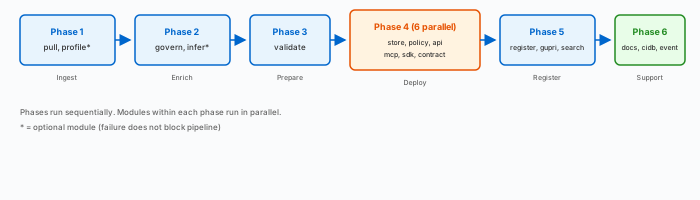
The orchestrator (rdt-model-compile run) spawns each module as a subprocess with --json, captures the result envelope from stdout, and aggregates into a PipelineResult.
Invocation modes
Section titled “Invocation modes”Every module supports two invocation modes:
| Mode | When | Example |
|---|---|---|
| Flag mode | Interactive/local use | rdt-model-pull --target dev --entity waste-tracking pull |
| Manifest mode | Pipeline orchestration | rdt-model-pull --manifest /tmp/rdt-waste-tracking-abc/pull-manifest.json --json pull |
Both modes produce identical behaviour. The manifest provides entity, target, workspace path, input paths, and output directory — everything the module needs in a single JSON file.
Result envelopes
Section titled “Result envelopes”Every module emits a ModuleResult JSON envelope when invoked with --json:
{ "module": "rdt-model-store", "version": "0.1.0", "status": "ok", "entity_id": "waste-tracking", "timestamp": "2026-05-12T10:30:00Z", "duration_ms": 1200, "outputs": { "snowflake/ddl/waste-tracking.sql": "wrote", "dbt/models/bronze/waste-tracking.sql": "wrote", "dbt/models/bronze/waste-tracking.yml": "wrote" }, "errors": []}Status values: ok, warning (all outputs skipped/unchanged), partial (some errors but some outputs), error (complete failure).
Workspace isolation
Section titled “Workspace isolation”When running through the orchestrator with --workspace, every pipeline run gets an isolated directory. This prevents parallel runs from interfering with each other.
Workspace structure
Section titled “Workspace structure”/tmp/rdt-waste-tracking-a1b2c3d4/├── pull/ ← Phase 1 outputs│ ├── model.json│ └── pull-manifest.json├── govern/ ← Phase 2 outputs│ └── governance.json├── compile/ ← Phase 3 outputs│ └── artifacts/│ ├── datacontract.yaml│ ├── bronze.sql│ ├── dbt_bronze.sql│ └── ...├── deploy/ ← Phase 4 results├── register/ ← Phase 5 results├── support/ ← Phase 6 results├── pipeline-result.json ← Aggregated outcome└── pipeline-stderr.log ← Tracing outputParallel safety
Section titled “Parallel safety”Each entity and each run gets a unique workspace path:
Entity A, run 1: /tmp/rdt-waste-tracking-{uuid-1}/Entity A, run 2: /tmp/rdt-waste-tracking-{uuid-2}/Entity B, run 1: /tmp/rdt-organization-site-{uuid-3}/Zero contention. No file locks needed.
Workspace base directory
Section titled “Workspace base directory”The workspace root is resolved from environment variables in this order:
$RDT_WORKSPACE_DIR— explicit override$TMPDIR— system temp directory/tmp— fallback
Set RDT_WORKSPACE_DIR in CI if the runner’s temp directory has limited space.
Artifact promotion
Section titled “Artifact promotion”After all phases complete successfully, the promote step copies artifacts from the workspace to their canonical repo paths. This is what keeps the repo untouched when a pipeline fails.
rdt-model-compile --target dev --entity waste-tracking promote --workspace /tmp/rdt-waste-tracking-abcPromote maps workspace-relative paths to repo paths using the centralised paths.rs functions:
| Workspace path | Repo path |
|---|---|
pull/model.json | models/{entity}/model.json |
govern/governance.json | models/{entity}/governance.json |
compile/artifacts/datacontract.yaml | models/{entity}/datacontract.yaml |
compile/artifacts/bronze.sql | snowflake/ddl/{entity}.sql |
compile/artifacts/dbt_bronze.sql | dbt/models/bronze/{entity}.sql |
compile/artifacts/openapi.yaml | apis/{entity}/openapi.yaml |
compile/artifacts/mcp_tool.json | apis/{entity}/mcp_tool.json |
If a file in the workspace doesn’t exist (module was optional or skipped), promote silently skips it.
Promote output
Section titled “Promote output”{ "entity_id": "waste-tracking", "promoted": [ {"source": "pull/model.json", "destination": "models/waste-tracking/model.json", "action": "wrote"}, {"source": "compile/artifacts/bronze.sql", "destination": "snowflake/ddl/waste-tracking.sql", "action": "updated"} ], "skipped": ["infer/suggestions.json"]}CI integration
Section titled “CI integration”GitHub Actions workflow
Section titled “GitHub Actions workflow”The entity-pipeline.yml workflow automates multi-entity execution:

Job 1: Resolve entity matrix
Section titled “Job 1: Resolve entity matrix”Reads [entities].list from roche-data.toml and outputs a JSON matrix. You can override via workflow_dispatch with a comma-separated list.
Job 2: Build CLI
Section titled “Job 2: Build CLI”Builds all workspace binaries in release mode and uploads them as a GitHub Actions artifact. This runs once, shared by all entity jobs.
Job 3: Pipeline (matrix)
Section titled “Job 3: Pipeline (matrix)”One job per entity, running in parallel. Each job:
- Downloads the CLI binaries
- Loads secrets from Vault (using JWT auth)
- Runs
scripts/pipeline.sh <entity> --target <env> - Uploads
pipeline-result-<entity>.jsonas an artifact - On failure, uploads the workspace directory for debugging
Key settings:
fail-fast: false— one entity’s failure does not cancel othersmax-parallel: 5— limits concurrent runner usagetimeout-minutes: 30— prevents hung jobs
Job 4: Commit artifacts
Section titled “Job 4: Commit artifacts”Runs only if all pipeline jobs succeed. Commits promoted artifacts with a conventional commit message and pushes.
Job 5: Summary
Section titled “Job 5: Summary”Generates a GitHub Step Summary table showing entity status and duration.
Manual triggers
Section titled “Manual triggers”# Run all entities from roche-data.toml against devgh workflow run entity-pipeline.yml -f target=dev
# Run specific entities against testgh workflow run entity-pipeline.yml -f target=test -f entities="waste-tracking"
# Run against prod (requires approval)gh workflow run entity-pipeline.yml -f target=prodEnvironment promotion
Section titled “Environment promotion”
Each environment has its own GitHub Environment with protection rules. Vault secrets are scoped per environment (secret/dev/..., secret/test/..., secret/prod/...).
The pipeline script
Section titled “The pipeline script”scripts/pipeline.sh is the entry point for each entity pipeline run. It handles workspace lifecycle, orchestration, and promotion in a single script.
./scripts/pipeline.sh <entity> [--target dev|test|prod] [--keep-workspace]What it does:
- Generates a run ID (UUIDv4)
- Creates workspace with phase subdirectories
- Calls
rdt-model-compile run --workspace <ws> --json - Checks the pipeline status from
pipeline-result.json - On success (
okorwarning): runsrdt-model-compile promote - Copies
pipeline-result.jsonto repo root for CI artifact upload - Cleans up workspace (unless
--keep-workspace)
Use --keep-workspace to preserve the workspace for debugging:
./scripts/pipeline.sh waste-tracking --target dev --keep-workspacels /tmp/rdt-waste-tracking-*/Failure handling
Section titled “Failure handling”Phase-level failures
Section titled “Phase-level failures”| Scenario | Pipeline status | Behaviour |
|---|---|---|
| All required modules in a phase succeed | ok | Continue to next phase |
| Some required modules fail | partial | Continue, but pipeline marked partial |
| All required modules in a phase fail | error | Stop immediately — no further phases run |
| Optional module fails (profile, infer) | warning | Continue, noted in result |
Entity-level failures
Section titled “Entity-level failures”In multi-entity CI:
- Each entity runs independently (
fail-fast: false) - A failed entity’s workspace is uploaded as a debug artifact
- Other entities continue unaffected
- The commit-artifacts job only runs if ALL entities succeed
Debugging a failed pipeline
Section titled “Debugging a failed pipeline”- Download the workspace artifact from the GitHub Actions run
- Inspect
pipeline-result.jsonfor per-module status - Check
pipeline-stderr.logfor tracing output - Look at individual module result files in phase subdirectories
- Re-run locally with
--keep-workspace:
./scripts/pipeline.sh waste-tracking --target dev --keep-workspacecat /tmp/rdt-waste-tracking-*/pipeline-result.json | jq '.phases[].modules[] | select(.status == "error")'Retrying a failed entity
Section titled “Retrying a failed entity”# Retry just the failed entitygh workflow run entity-pipeline.yml -f target=dev -f entities="waste-tracking"Manifest schema reference
Section titled “Manifest schema reference”The pipeline manifest JSON conforms to cli/common/schemas/modules/pipeline-manifest.schema.json.
| Field | Type | Required | Description |
|---|---|---|---|
entity_id | string | yes | Entity identifier (alphanumeric, hyphens, underscores) |
workspace | string | yes | Absolute path to workspace root |
target | enum | yes | dev, test, or prod |
run_id | string | yes | UUIDv7 correlation ID |
dry_run | boolean | no | Skip side-effects (default: false) |
inputs | object | no | Named input paths relative to workspace |
output_dir | string | yes | Phase subdirectory for outputs |
Example:
{ "entity_id": "waste-tracking", "workspace": "/tmp/rdt-waste-tracking-abc123", "target": "dev", "run_id": "abc123", "dry_run": false, "inputs": { "model": "pull/model.json", "governance": "govern/governance.json" }, "output_dir": "deploy"}Conflict prevention
Section titled “Conflict prevention”| Scenario | Protection |
|---|---|
| Two entities in parallel CI jobs | Separate runners + separate workspaces. Entity-scoped paths are non-overlapping. |
| Same entity re-run (retry) | Different UUIDv7 = different workspace. No collision. |
Shared files (e.g. rules/registry.yaml) | Promote runs sequentially in commit-artifacts. Merge if needed. |
| Failed pipeline | Workspace is never promoted. Repo remains clean. |
Related pages
Section titled “Related pages”- Pipeline Overview — architecture, phase dependencies, data wiring
- rdt-model-compile — orchestrator module reference
- Quality Assurance — DQ gate model
- Configuration Reference —
roche-data.tomlschema